Cheat
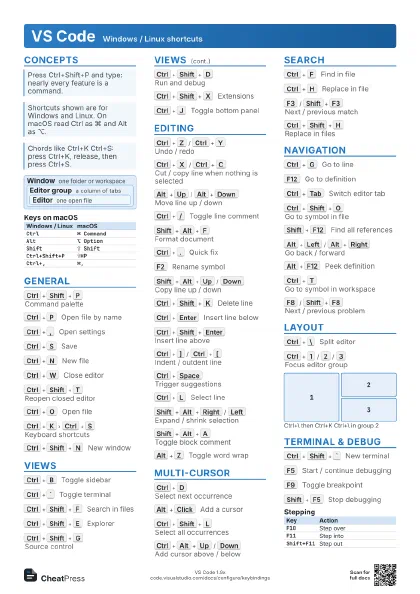
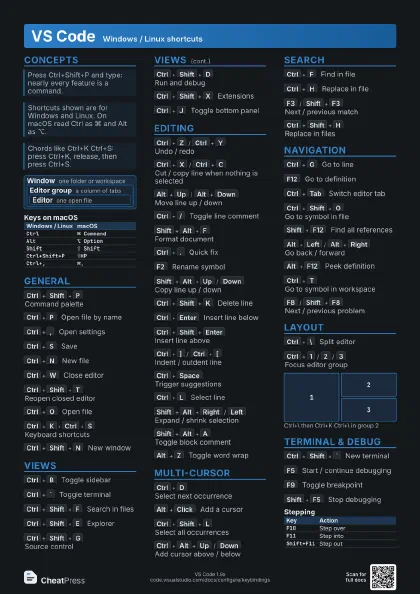
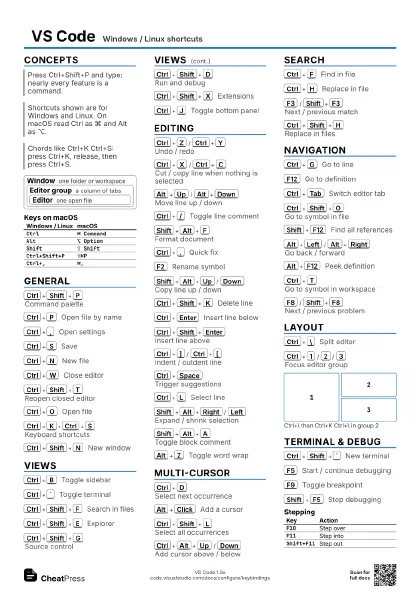
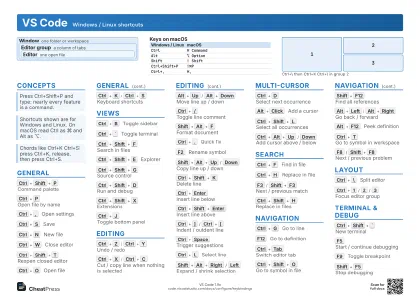
VS Code Windows / Linux shortcuts
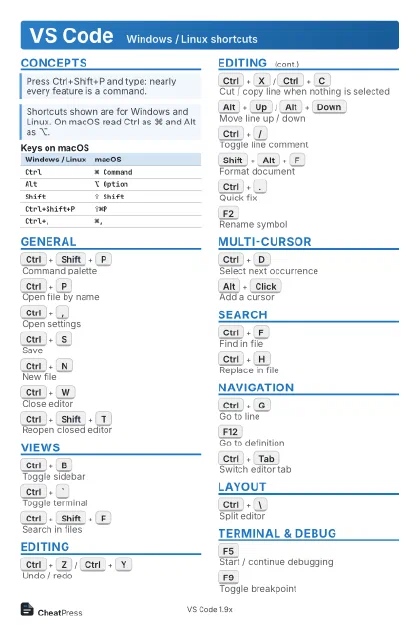 Light · Postcard
102 × 152 mm · PDF
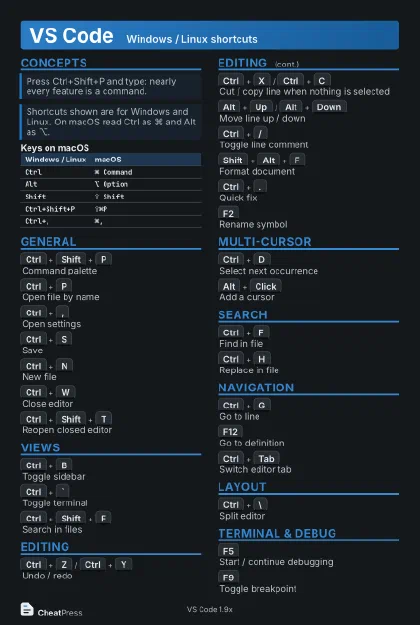 Dark · Postcard
102 × 152 mm · PDF
 Ink saver · Postcard
102 × 152 mm · PDF
 Light · A4 landscape
297 × 210 mm · PDF
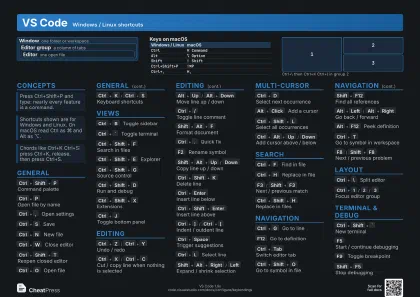 Dark · A4 landscape
297 × 210 mm · PDF
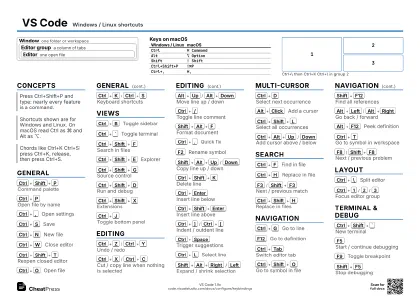 Ink saver · A4 landscape
297 × 210 mm · PDF
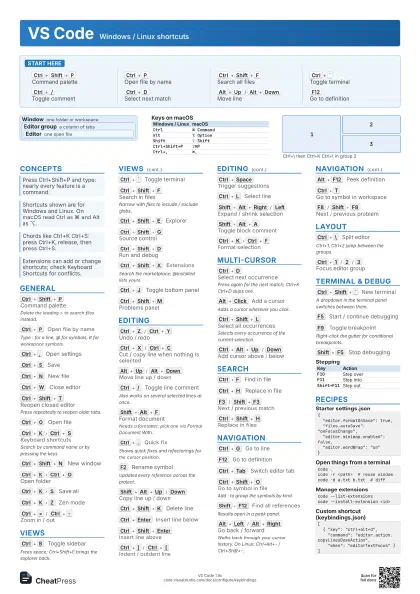
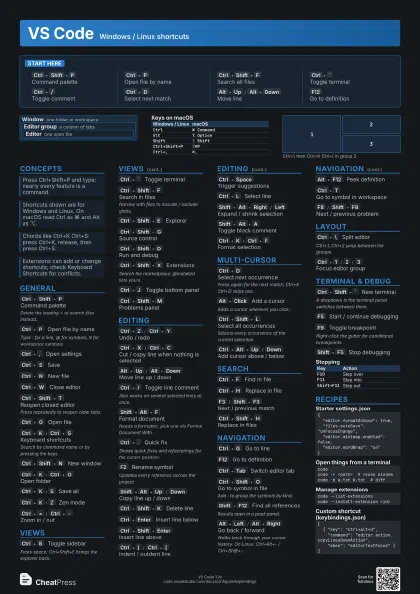
 Light · A3 landscape
420 × 297 mm · PDF
 Dark · A3 landscape
420 × 297 mm · PDF
 Ink saver · A3 landscape
420 × 297 mm · PDF
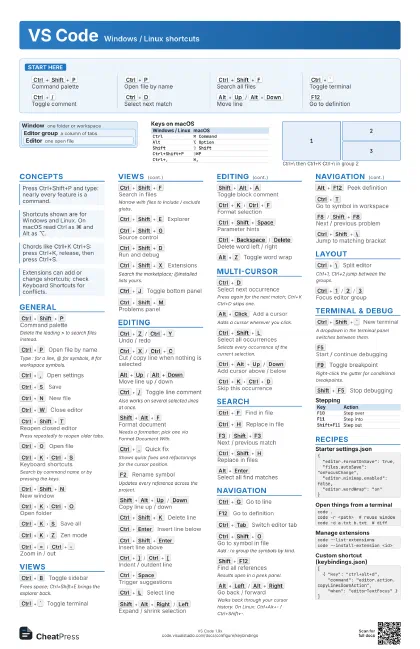
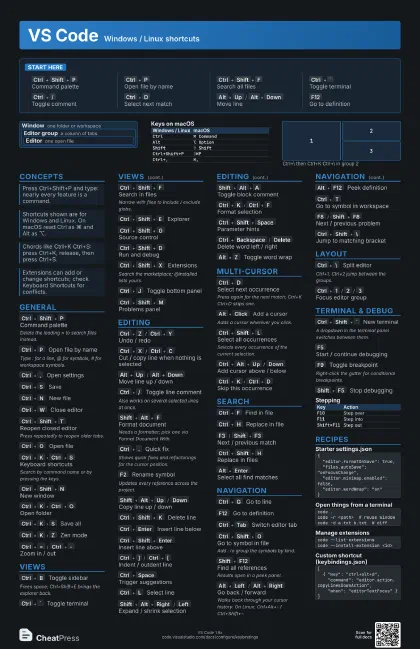
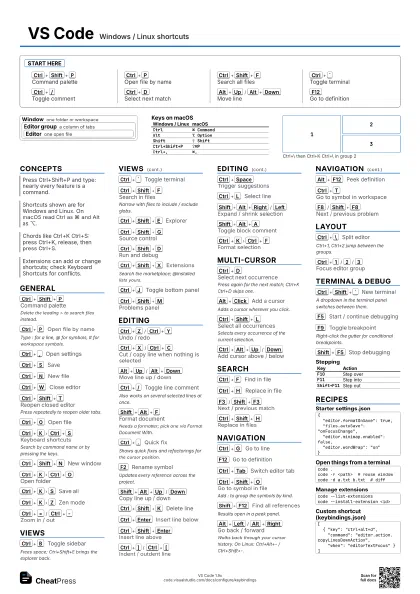
Start here
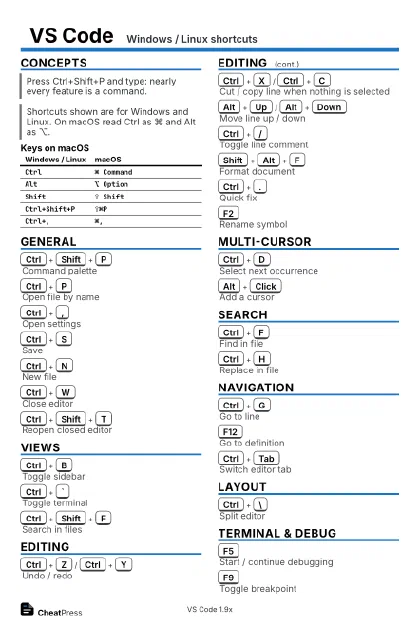
Ctrl+Shift+P
Command palette
Ctrl+P
Open file by name
Ctrl+Shift+F
Search all files
Ctrl+`
Toggle terminal
Ctrl+/
Toggle comment
Ctrl+D
Select next match
Alt+Up
/
Alt+Down
Move line
F12
Go to definition
Concepts
Window one folder or workspace
Editor group
a column of tabs
Editor one open file
| Windows / Linux | macOS |
|---|---|
Ctrl |
⌘ Command |
Alt |
⌥ Option |
Shift |
⇧ Shift |
Ctrl+Shift+P |
⇧⌘P |
Ctrl+, |
⌘, |
General
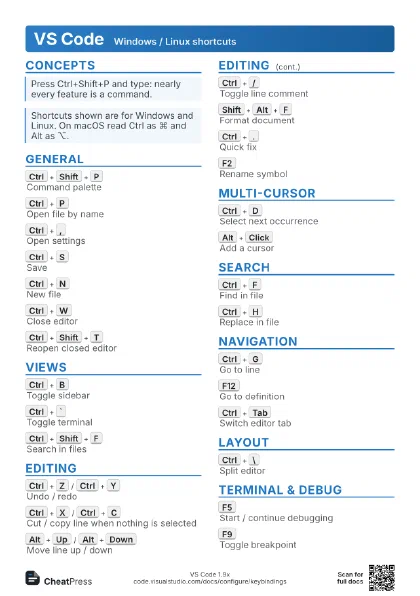
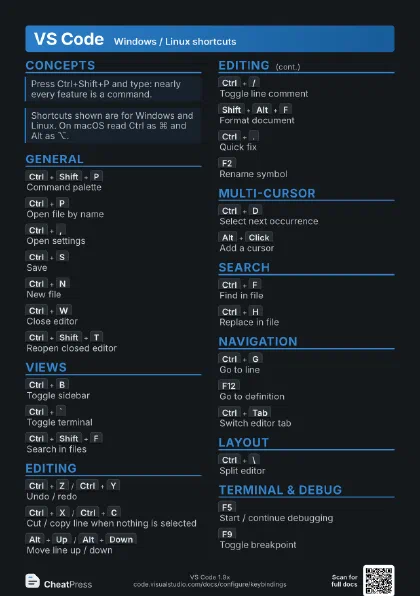
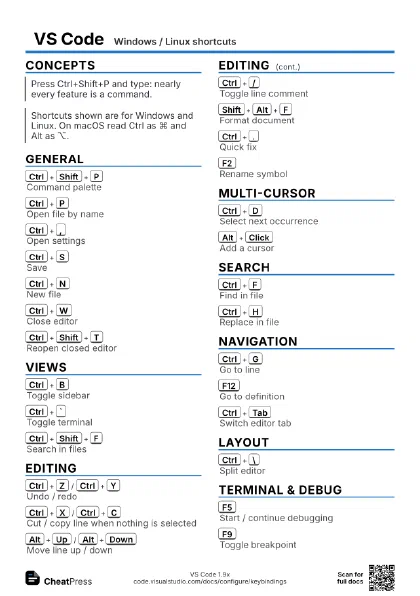
Ctrl+Shift+P
Command palette
Delete the leading > to search files instead.
Ctrl+P
Open file by name
Type : for a line, @ for symbols, # for workspace symbols.
Ctrl+,
Open settings
Ctrl+S
Save
Ctrl+N
New file
Ctrl+W
Close editor
Ctrl+Shift+T
Reopen closed editor
Press repeatedly to reopen older tabs.
Ctrl+O
Open file
Ctrl+K
Ctrl+S
Keyboard shortcuts
Search by command name or by pressing the keys.
Ctrl+Shift+N
New window
Ctrl+K
Ctrl+O
Open folder
Ctrl+K
S
Save all
Ctrl+K
Z
Zen mode
Ctrl+=
/
Ctrl+-
Zoom in / out
F11
Full screen
Views
Ctrl+B
Toggle sidebar
Frees space; Ctrl+Shift+E brings the explorer back.
Ctrl+`
Toggle terminal
Ctrl+Shift+F
Search in files
Narrow with files to include / exclude globs.
Ctrl+Shift+E
Explorer
Ctrl+Shift+G
Source control
Ctrl+Shift+D
Run and debug
Ctrl+Shift+X
Extensions
Search the marketplace; @installed lists yours.
Ctrl+J
Toggle bottom panel
Ctrl+Shift+M
Problems panel
Ctrl+Shift+U
Output panel
Ctrl+K
Ctrl+Left
Focus previous group
Editing
Ctrl+Z
/
Ctrl+Y
Undo / redo
Ctrl+X
/
Ctrl+C
Cut / copy line when nothing is selected
Alt+Up
/
Alt+Down
Move line up / down
Ctrl+/
Toggle line comment
Also works on several selected lines at once.
Shift+Alt+F
Format document
Needs a formatter; pick one via Format Document With.
Ctrl+.
Quick fix
Shows quick fixes and refactorings for the cursor position.
F2
Rename symbol
Updates every reference across the project.
Shift+Alt+Up
/
Down
Copy line up / down
Ctrl+Shift+K
Delete line
Ctrl+Enter
Insert line below
Ctrl+Shift+Enter
Insert line above
Ctrl+]
/
Ctrl+[
Indent / outdent line
Ctrl+Space
Trigger suggestions
Ctrl+L
Select line
Shift+Alt+Right
/
Left
Expand / shrink selection
Shift+Alt+A
Toggle block comment
Ctrl+K
Ctrl+F
Format selection
Ctrl+Shift+Space
Parameter hints
Ctrl+Backspace
/
Delete
Delete word left / right
Alt+Z
Toggle word wrap
Multi-Cursor
Ctrl+D
Select next occurrence
Press again for the next match; Ctrl+K Ctrl+D skips
one.
Alt+Click
Add a cursor
Adds a cursor wherever you click.
Ctrl+Shift+L
Select all occurrences
Selects every occurrence of the current selection.
Ctrl+Alt+Up
/
Down
Add cursor above / below
Ctrl+K
Ctrl+D
Skip this occurrence
Ctrl+U
Undo last cursor action
Search
Ctrl+F
Find in file
Ctrl+H
Replace in file
F3
/
Shift+F3
Next / previous match
Ctrl+Shift+H
Replace in files
Alt+Enter
Select all find matches
Navigation
Ctrl+G
Go to line
F12
Go to definition
Ctrl+Tab
Switch editor tab
Ctrl+Shift+O
Go to symbol in file
Add : to group the symbols by kind.
Shift+F12
Find all references
Results open in a peek panel.
Alt+Left
/
Alt+Right
Go back / forward
Walks back through your cursor history. On Linux:
Ctrl+Alt+- / Ctrl+Shift+-.
Alt+F12
Peek definition
Ctrl+T
Go to symbol in workspace
F8
/
Shift+F8
Next / previous problem
Ctrl+Shift+\
Jump to matching bracket
Ctrl+Home
/
Ctrl+End
Start / end of file
Layout
Ctrl+\
Split editor
Ctrl+1, Ctrl+2 jump between the groups.
Ctrl+1
/
2
/
3
Focus editor group
Ctrl+K
Ctrl+\
Split orthogonally
Ctrl+K
W
Close all editors in group
Ctrl+K
P
Copy path of active file
Ctrl+K
R
Reveal file in explorer
1
2
3
Terminal & Debug
Ctrl+Shift+`
New terminal
A dropdown in the terminal panel switches between them.
Ctrl+Shift+B
Run build task
F5
Start / continue debugging
F9
Toggle breakpoint
Right-click the gutter for conditional breakpoints.
Shift+F5
Stop debugging
| Key | Action |
|---|---|
F10 |
Step over |
F11 |
Step into |
Shift+F11 |
Step out |
Recipes
{ "editor.formatOnSave": true, "files.autoSave": "onFocusChange", "editor.minimap.enabled": false, "editor.wordWrap": "on"}code .code -r <path> # reuse windowcode -d a.txt b.txt # diffcode --list-extensionscode --install-extension <id>[ { "key": "ctrl+alt+d", "command": "editor.action.copyLinesDownAction", "when": "editorTextFocus" }]