Cheat
ExifTool Metadata reader/writer
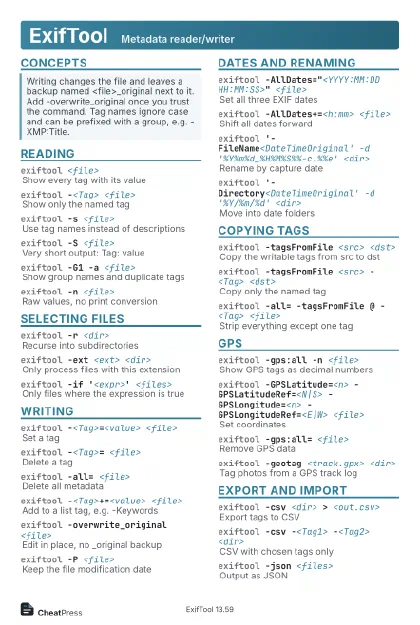 Light · Postcard
102 × 152 mm · PDF
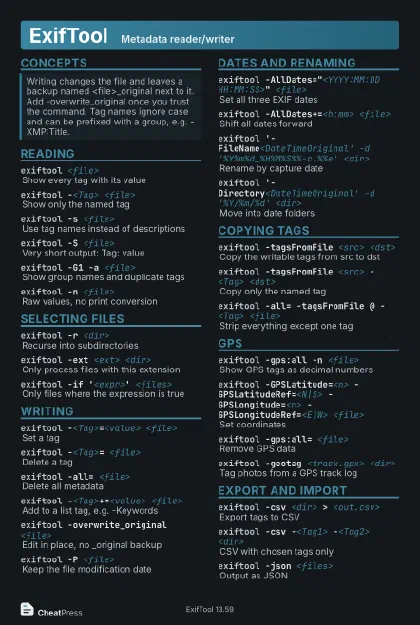 Dark · Postcard
102 × 152 mm · PDF
 Ink saver · Postcard
102 × 152 mm · PDF
 Light · A4 landscape
297 × 210 mm · PDF
 Dark · A4 landscape
297 × 210 mm · PDF
 Ink saver · A4 landscape
297 × 210 mm · PDF
 Light · A3 landscape
420 × 297 mm · PDF
 Dark · A3 landscape
420 × 297 mm · PDF
 Ink saver · A3 landscape
420 × 297 mm · PDF
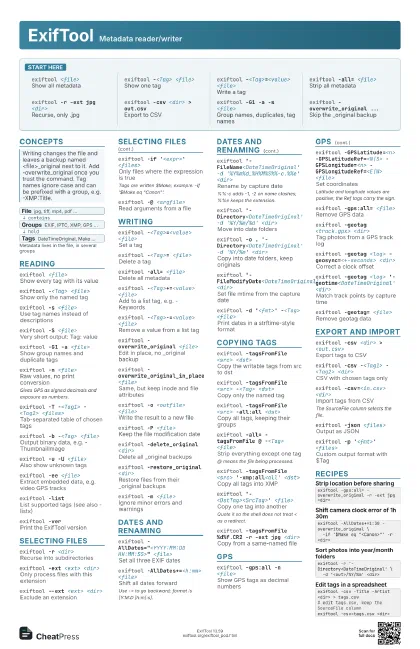
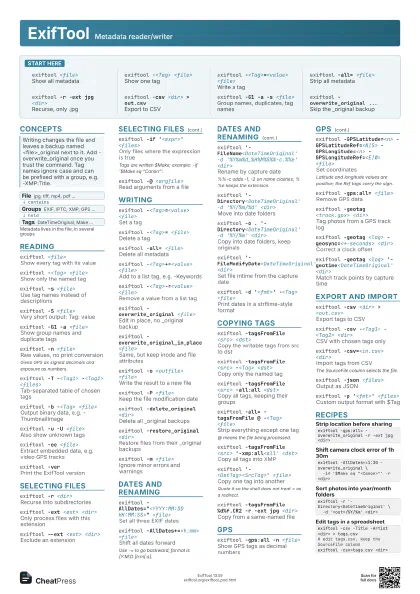
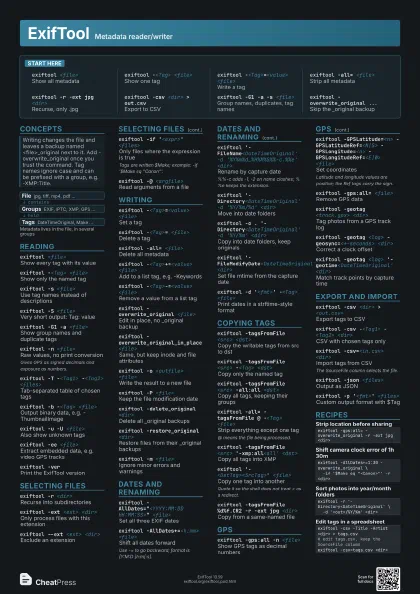
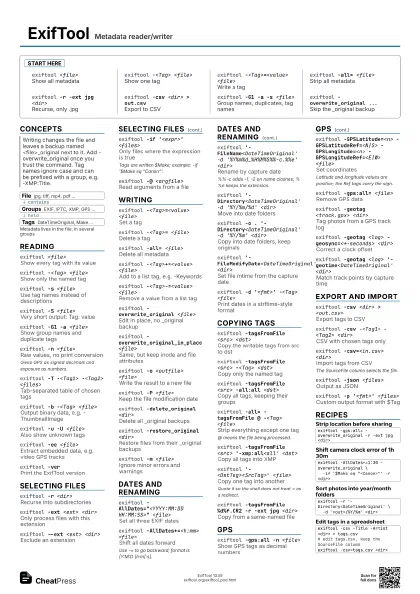
Start here
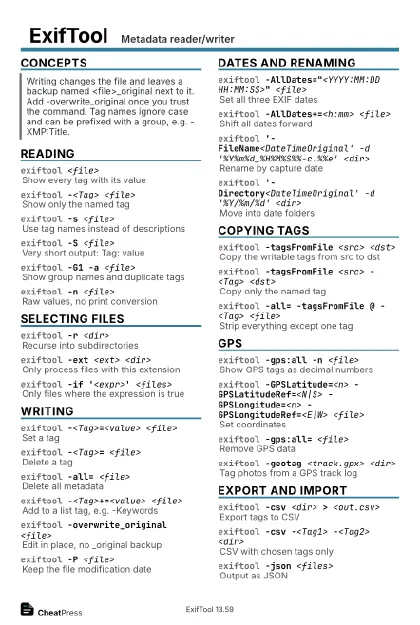
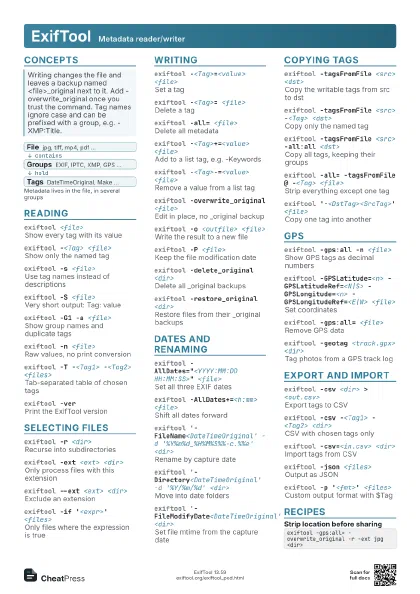
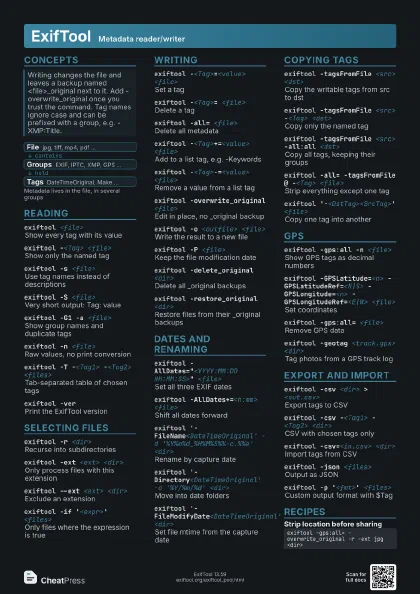
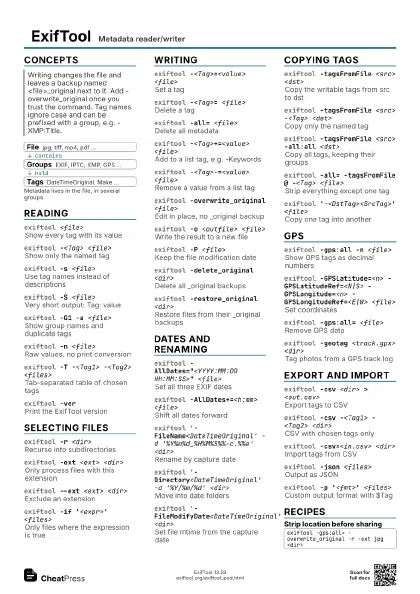
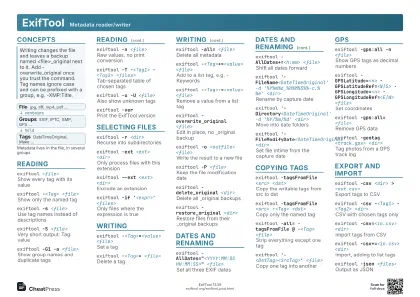
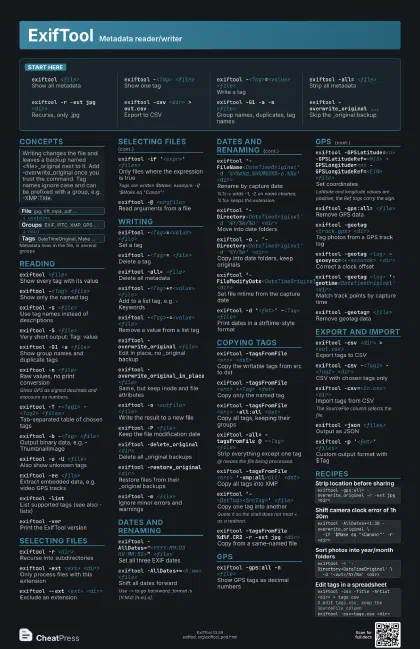
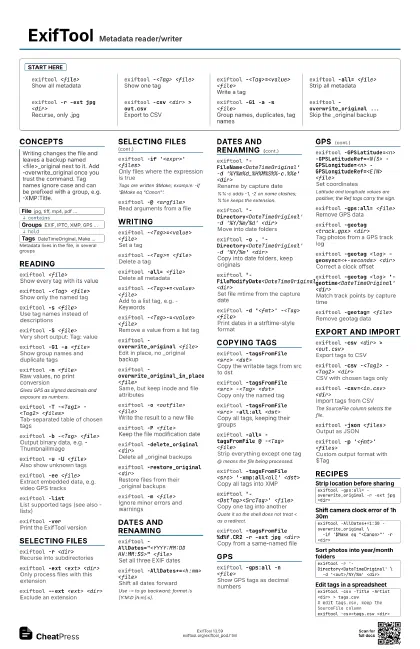
exiftool <file>
Show all metadata
exiftool -<Tag> <file>
Show one tag
exiftool -<Tag>=<value> <file>
Write a tag
exiftool -all= <file>
Strip all metadata
exiftool -r -ext jpg <dir>
Recurse, only .jpg
exiftool -csv <dir> > out.csv
Export to CSV
exiftool -G1 -a -s <file>
Group names, duplicates, tag names
exiftool -overwrite_original ...
Skip the _original backup
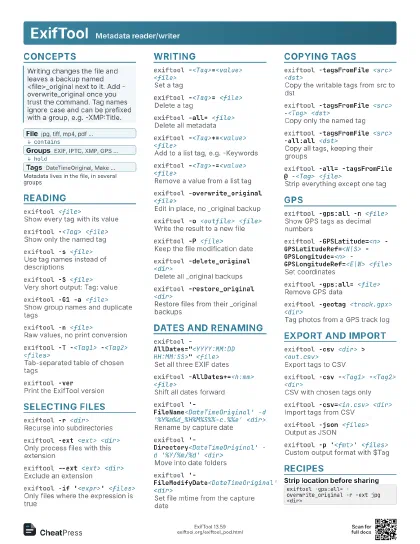
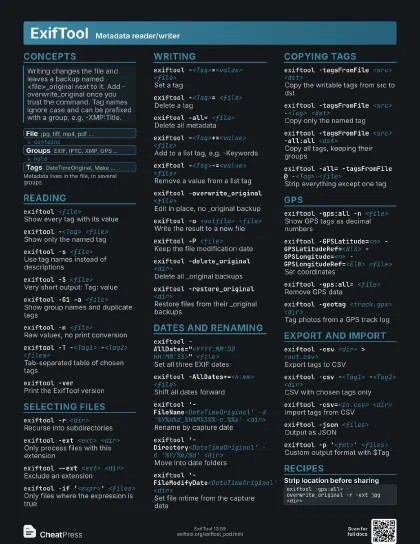
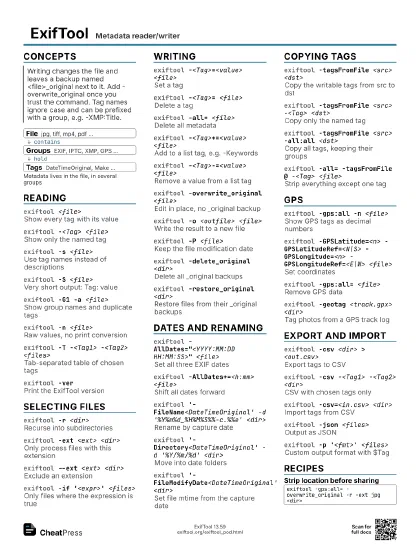
Concepts
- File jpg, tiff, mp4, pdf ...
- Groups EXIF, IPTC, XMP, GPS ...
- Tags DateTimeOriginal, Make ...
Reading
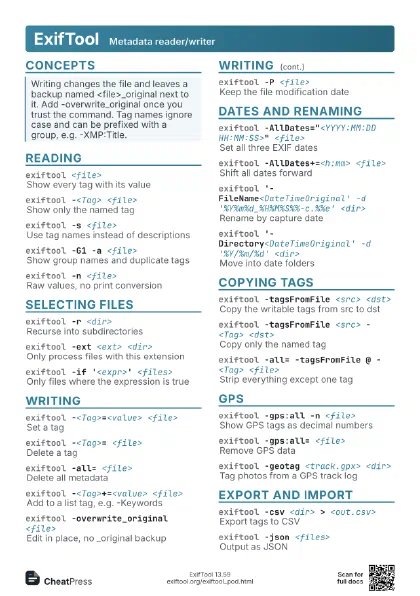
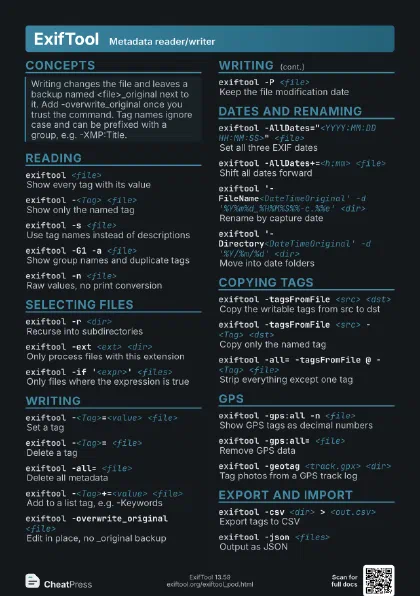
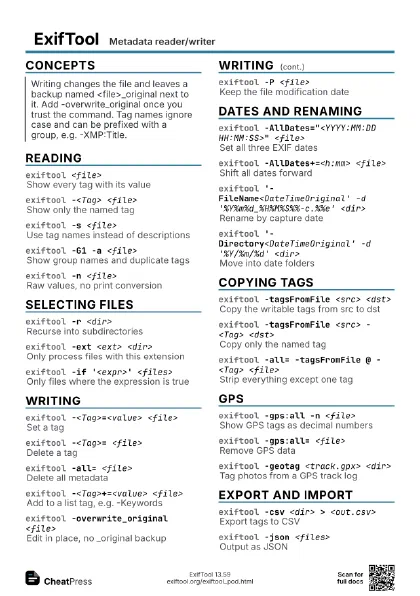
exiftool <file>
Show every tag with its value
exiftool -<Tag> <file>
Show only the named tag
exiftool -s <file>
Use tag names instead of descriptions
exiftool -S <file>
Very short output: Tag: value
exiftool -G1 -a <file>
Show group names and duplicate tags
exiftool -n <file>
Raw values, no print conversion
Gives GPS as signed decimals and exposure as numbers.
exiftool -T -<Tag1> -<Tag2> <files>
Tab-separated table of chosen tags
exiftool -b -<Tag> <file>
Output binary data, e.g. -ThumbnailImage
exiftool -u -U <file>
Also show unknown tags
exiftool -ee <file>
Extract embedded data, e.g. video GPS tracks
exiftool -listList supported tags (see also -listx)
exiftool -verPrint the ExifTool version
Selecting files
exiftool -r <dir>
Recurse into subdirectories
exiftool -ext <ext> <dir>
Only process files with this extension
exiftool --ext <ext> <dir>
Exclude an extension
exiftool -if '<expr>' <files>
Only files where the expression is true
Tags are written $Make; example: -if '$Make eq
"Canon"'.
exiftool -@ <argfile>
Read arguments from a file
Writing
exiftool -<Tag>=<value> <file>
Set a tag
exiftool -<Tag>= <file>
Delete a tag
exiftool -all= <file>
Delete all metadata
exiftool -<Tag>+=<value> <file>
Add to a list tag, e.g. -Keywords
exiftool -<Tag>-=<value> <file>
Remove a value from a list tag
exiftool -overwrite_original <file>
Edit in place, no _original backup
exiftool -overwrite_original_in_place <file>
Same, but keep inode and file attributes
exiftool -o <outfile> <file>
Write the result to a new file
exiftool -P <file>
Keep the file modification date
exiftool -delete_original <dir>
Delete all _original backups
exiftool -restore_original <dir>
Restore files from their _original backups
exiftool -m <file>
Ignore minor errors and warnings
Dates and renaming
exiftool -AllDates="<YYYY:MM:DD HH:MM:SS>"
                    <file>
Set all three EXIF dates
exiftool -AllDates+=<h:mm> <file>
Shift all dates forward
Use -= to go backward; format is [Y:M:D ]h:m[:s].
exiftool '-FileName<DateTimeOriginal' -d
                    '%Y%m%d_%H%M%S%%-c.%%e' <dir>
Rename by capture date
%%-c adds -1, -2 on name clashes; %%e keeps the extension.
exiftool '-Directory<DateTimeOriginal' -d
                    '%Y/%m/%d' <dir>
Move into date folders
exiftool -o . '-Directory<DateTimeOriginal' -d
                    '%Y/%m' <dir>
Copy into date folders, keep originals
exiftool '-FileModifyDate<DateTimeOriginal'
                    <dir>
Set file mtime from the capture date
exiftool -d '<fmt>' -<Tag>
                    <file>
Print dates in a strftime-style format
Copying tags
exiftool -tagsFromFile <src> <dst>
Copy the writable tags from src to dst
exiftool -tagsFromFile <src> -<Tag>
                    <dst>
Copy only the named tag
exiftool -tagsFromFile <src> -all:all
                    <dst>
Copy all tags, keeping their groups
exiftool -all= -tagsFromFile @ -<Tag>
                    <file>
Strip everything except one tag
@ means the file being processed.
exiftool -tagsFromFile <src>
                    '-xmp:all<all' <dst>
Copy all tags into XMP
exiftool '-<DstTag><SrcTag>'
                    <file>
Copy one tag into another
Quote it so the shell does not treat < as a redirect.
exiftool -tagsFromFile %d%f.CR2 -r -ext jpg
                    <dir>
Copy from a same-named file
GPS
exiftool -gps:all -n <file>
Show GPS tags as decimal numbers
exiftool -GPSLatitude=<n> -GPSLatitudeRef=<N|S>
                    -GPSLongitude=<n> -GPSLongitudeRef=<E|W>
                    <file>
Set coordinates
Latitude and longitude values are positive; the Ref tags carry
the sign.
exiftool -gps:all= <file>
Remove GPS data
exiftool -geotag <track.gpx> <dir>
Tag photos from a GPS track log
exiftool -geotag <log> -geosync=<+-seconds>
                    <dir>
Correct a clock offset
exiftool -geotag <log>
                    '-geotime<DateTimeOriginal' <dir>
Match track points by capture time
exiftool -geotag= <file>
Remove geotag data
Export and import
exiftool -csv <dir> > <out.csv>
Export tags to CSV
exiftool -csv -<Tag1> -<Tag2> <dir>
CSV with chosen tags only
exiftool -csv=<in.csv> <dir>
Import tags from CSV
The SourceFile column selects the file.
exiftool -csv+=<in.csv> <dir>
Import, adding to list tags
exiftool -json <files>
Output as JSON
exiftool -json=<in.json> <files>
Import tags from JSON
exiftool -p '<fmt>' <files>
Custom output format with $Tag
Recipes
exiftool -gps:all= -overwrite_original -r -ext jpg <dir>exiftool -AllDates+=1:30 -overwrite_original \ -if '$Make eq "<Canon>"' -r <dir>exiftool -r '-Directory<DateTimeOriginal' \ -d '<out>/%Y/%m' <dir>exiftool -csv -Title -Artist <dir> > tags.csv# edit tags.csv, keep the SourceFile columnexiftool -csv=tags.csv <dir>