Cheat
aerc Terminal email client
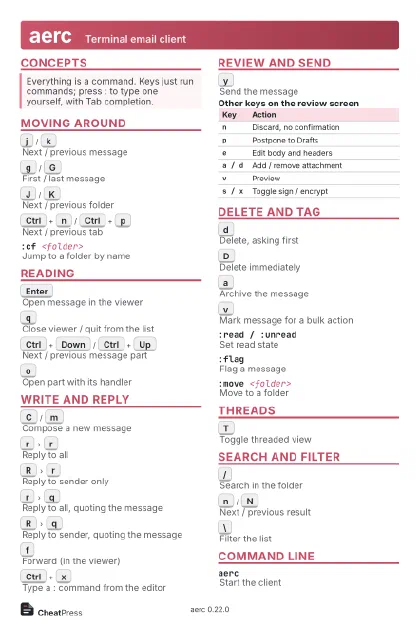 Light · Postcard
102 × 152 mm · PDF
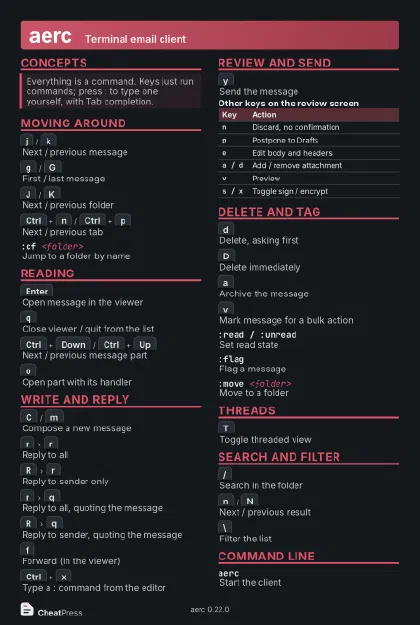 Dark · Postcard
102 × 152 mm · PDF
 Ink saver · Postcard
102 × 152 mm · PDF
 Light · A4 landscape
297 × 210 mm · PDF
 Dark · A4 landscape
297 × 210 mm · PDF
 Ink saver · A4 landscape
297 × 210 mm · PDF
 Light · A3 landscape
420 × 297 mm · PDF
 Dark · A3 landscape
420 × 297 mm · PDF
 Ink saver · A3 landscape
420 × 297 mm · PDF
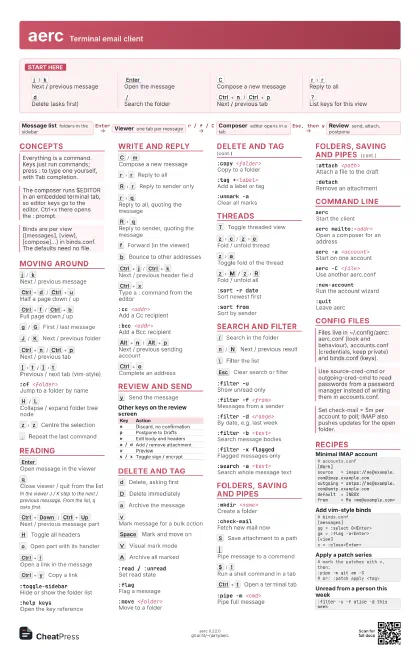
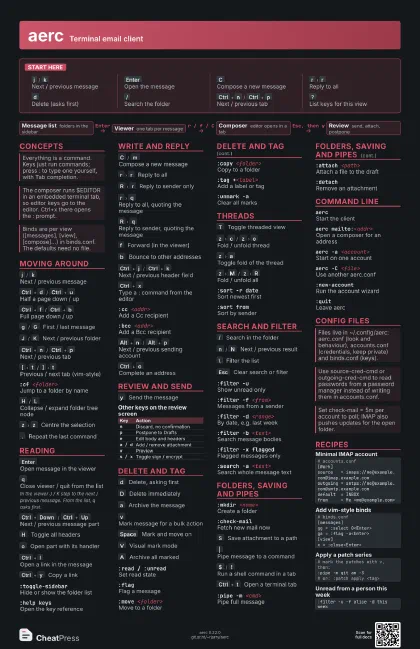
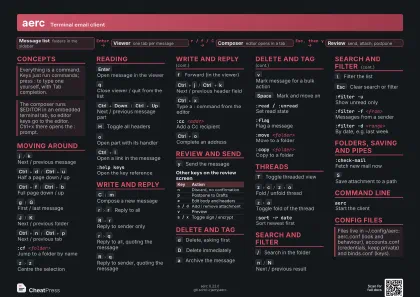
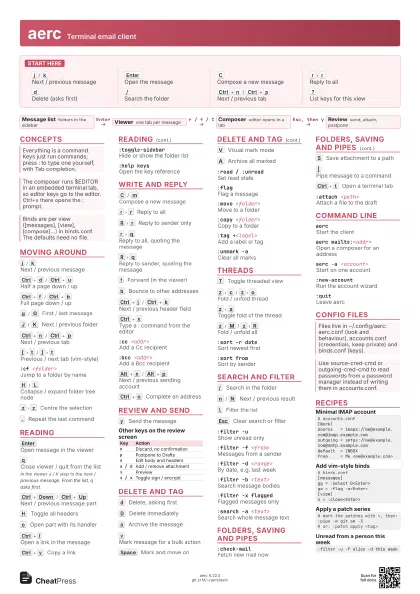
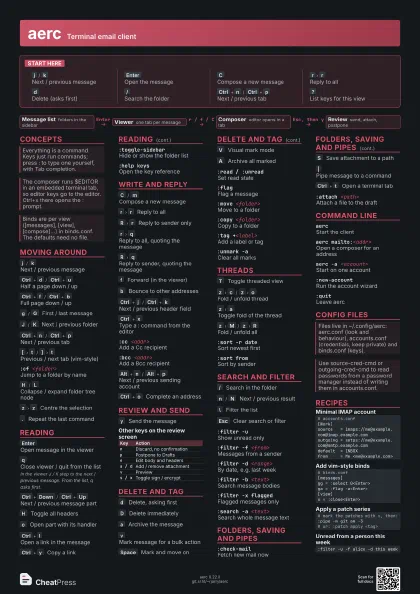
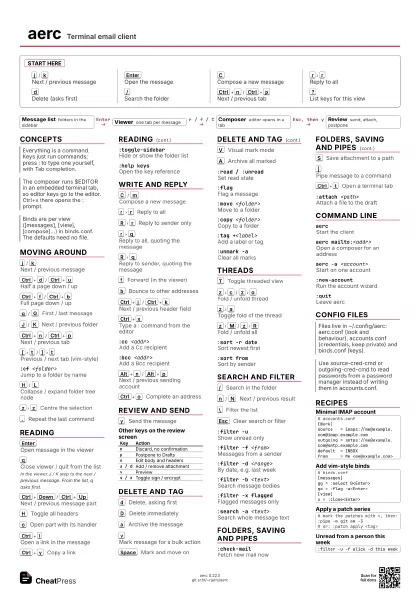
Start here
j
/
k
Next / previous message
Enter
Open the message
C
Compose a new message
r
r
Reply to all
d
Delete (asks first)
/
Search the folder
Ctrl+n
/
Ctrl+p
Next / previous tab
?
List keys for this view
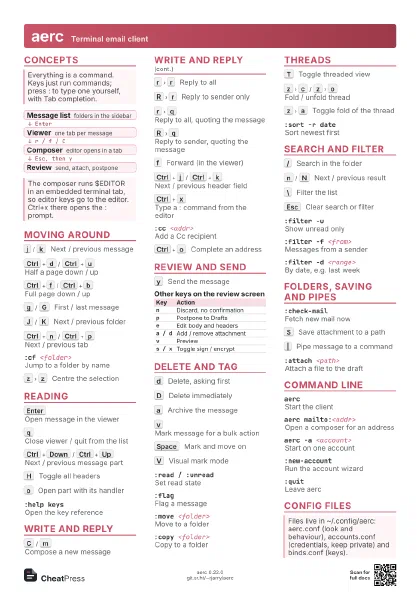
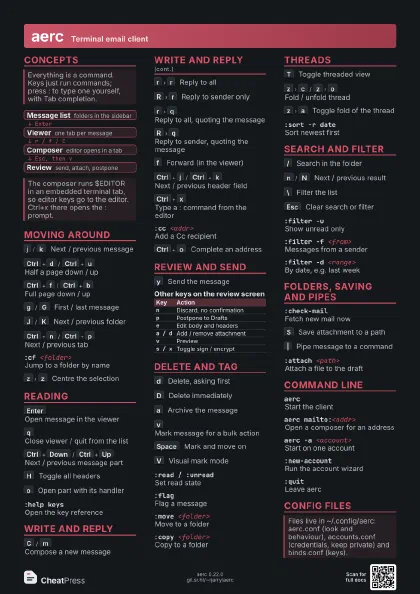
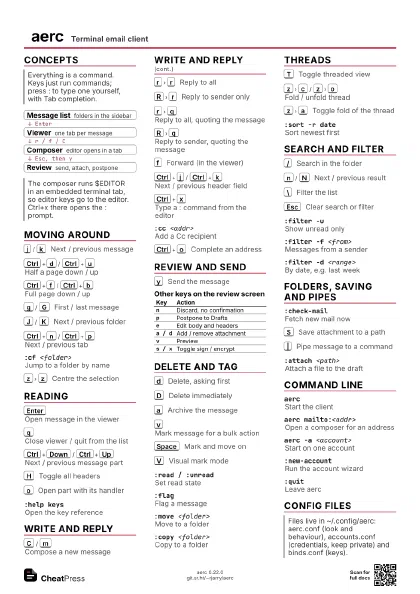
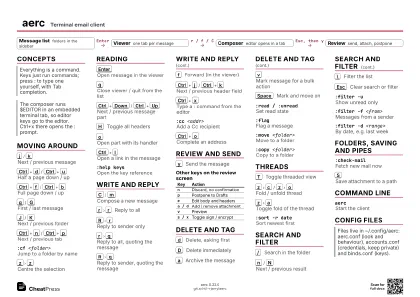
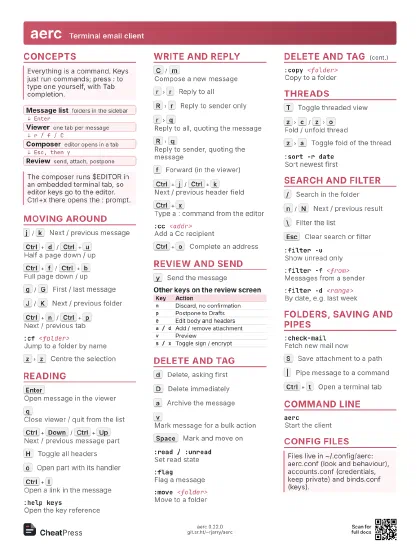
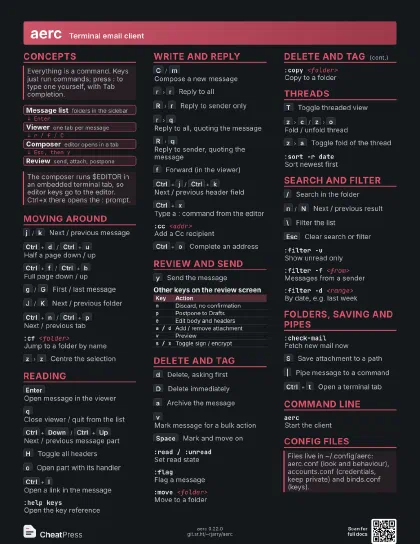
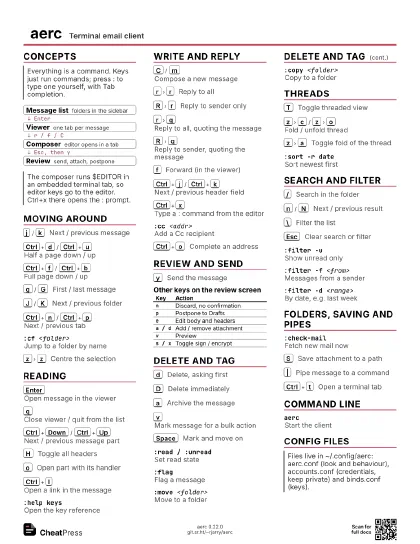
Concepts
- Message list folders in the sidebar
- Viewer one tab per message
- Composer editor opens in a tab
- Review send, attach, postpone
Moving Around
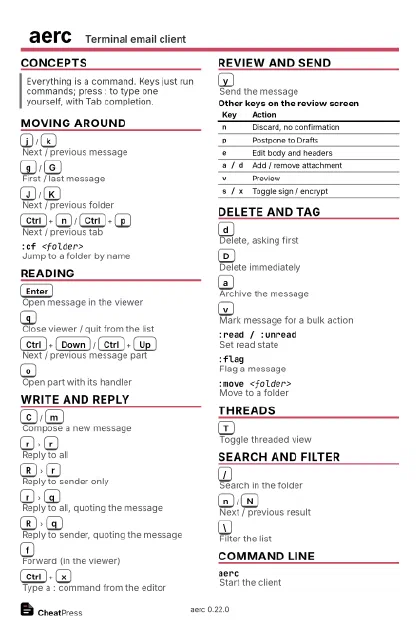
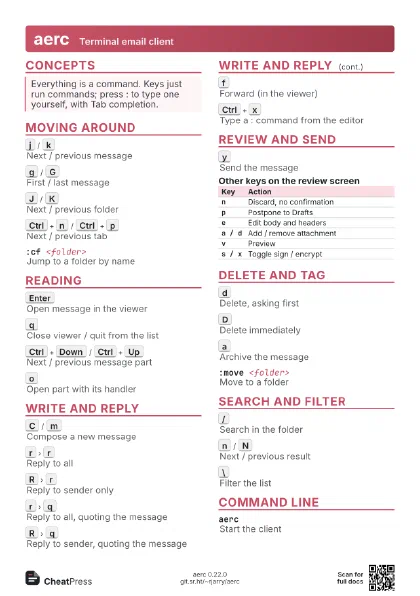
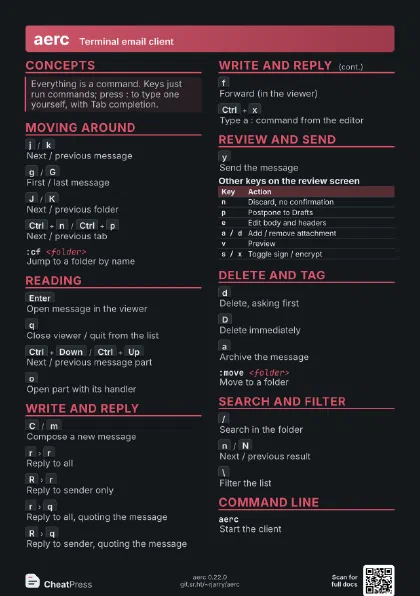
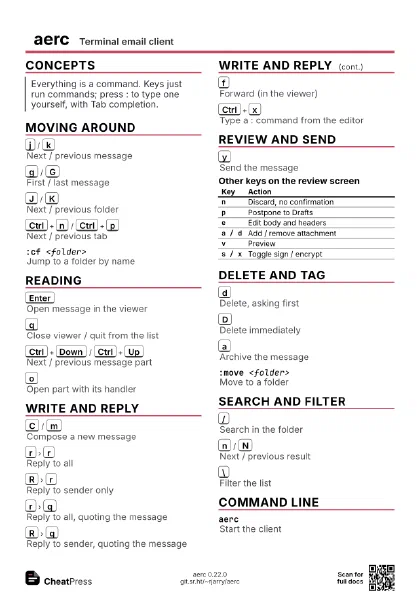
j
/
k
Next / previous message
Ctrl+d
/
Ctrl+u
Half a page down / up
Ctrl+f
/
Ctrl+b
Full page down / up
g
/
G
First / last message
J
/
K
Next / previous folder
Ctrl+n
/
Ctrl+p
Next / previous tab
Ctrl+PgDn
/
Ctrl+PgUp
Next / previous tab (alternative)
[
t
/
]
t
Previous / next tab (vim-style)
:cf <folder>
Jump to a folder by name
H
/
L
Collapse / expand folder tree node
z
z
Centre the selection
.
Repeat the last command
Ctrl+z
Suspend aerc
Reading
Enter
Open message in the viewer
q
Close viewer / quit from the list
In the viewer J / K step to the next / previous message. From
the list, q asks first.
Ctrl+Down
/
Ctrl+Up
Next / previous message part
H
Toggle all headers
o
Open part with its handler
Ctrl+l
Open a link in the message
Ctrl+y
Copy a link
:toggle-sidebarHide or show the folder list
:help keysOpen the key reference
Write and Reply
C
/
m
Compose a new message
r
r
Reply to all
R
r
Reply to sender only
r
q
Reply to all, quoting the message
R
q
Reply to sender, quoting the message
f
Forward (in the viewer)
b
Bounce to other addresses
Ctrl+j
/
Ctrl+k
Next / previous header field
Ctrl+x
Type a : command from the editor
:cc <addr>
Add a Cc recipient
:bcc <addr>
Add a Bcc recipient
Alt+n
/
Alt+p
Next / previous sending account
Ctrl+o
Complete an address
Review and Send
y
Send the message
| Key | Action |
|---|---|
n |
Discard, no confirmation |
p |
Postpone to Drafts |
e |
Edit body and headers |
a / d |
Add / remove attachment |
v |
Preview |
s / x |
Toggle sign / encrypt |
Delete and Tag
d
Delete, asking first
D
Delete immediately
a
Archive the message
v
Mark message for a bulk action
Space
Mark and move on
V
Visual mark mode
A
Archive all marked
:read / :unreadSet read state
:flagFlag a message
:move <folder>
Move to a folder
:copy <folder>
Copy to a folder
:tag +<label>
Add a label or tag
:unmark -aClear all marks
Threads
T
Toggle threaded view
z
c
/
z
o
Fold / unfold thread
z
a
Toggle fold of the thread
z
M
/
z
R
Fold / unfold all
:sort -r dateSort newest first
:sort fromSort by sender
Search and Filter
/
Search in the folder
n
/
N
Next / previous result
\
Filter the list
Esc
Clear search or filter
:filter -uShow unread only
:filter -f <from>
Messages from a sender
:filter -d <range>
By date, e.g. last week
:filter -b <text>
Search message bodies
:filter -x flagged
Flagged messages only
:search -a <text>
Search whole message text
Folders, Saving and Pipes
:mkdir <name>
Create a folder
:check-mailFetch new mail now
S
Save attachment to a path
|
Pipe message to a command
$
/
!
Run a shell command in a tab
Ctrl+t
Open a terminal tab
:pipe -m <cmd>
Pipe full message
:attach <path>
Attach a file to the draft
:detachRemove an attachment
Command Line
aercStart the client
aerc mailto:<addr>
Open a composer for an address
aerc -a <account>
Start on one account
aerc -C <file>
Use another aerc.conf
aerc -vPrint version
:new-accountRun the account wizard
:quitLeave aerc
Config Files
| Scheme | Backend |
|---|---|
imaps:// |
IMAP over TLS |
maildir:// |
Local Maildir |
notmuch:// |
Notmuch database |
jmap:// |
JMAP |
Recipes
# accounts.conf[Work]source = imaps://me@example.com@imap.example.comoutgoing = smtps://me@example.com@smtp.example.comdefault = INBOXfrom = Me <me@example.com># binds.conf[messages]gg = :select 0<Enter>ga = :flag -a<Enter>[view]x = :close<Enter># mark the patches with v, then::pipe -m git am -3# or: :patch apply <tag>:filter -u -f alice -d this week