Cheat
Firefox DevTools Windows / Linux shortcuts
 Light · Postcard
102 × 152 mm · PDF
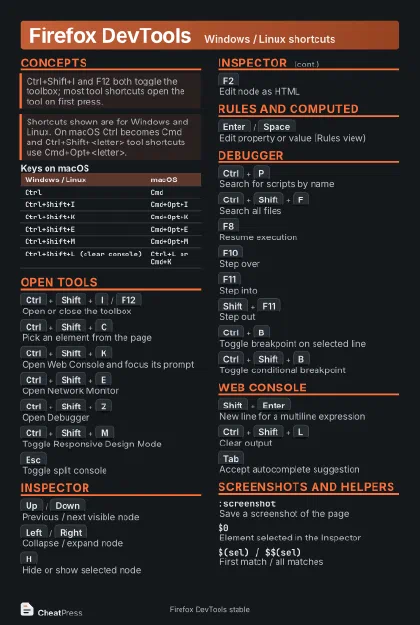 Dark · Postcard
102 × 152 mm · PDF
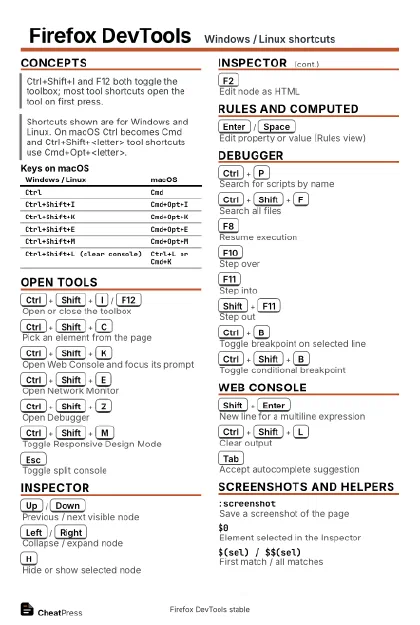 Ink saver · Postcard
102 × 152 mm · PDF
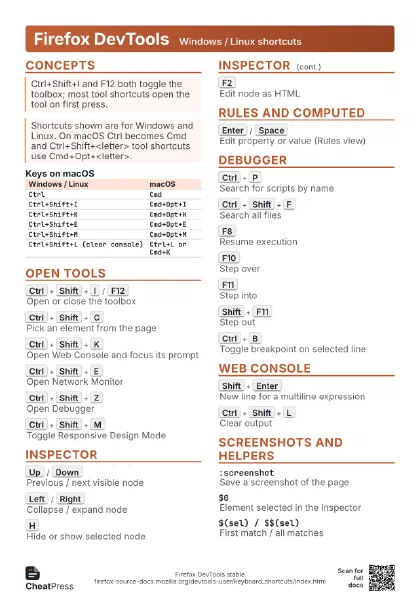
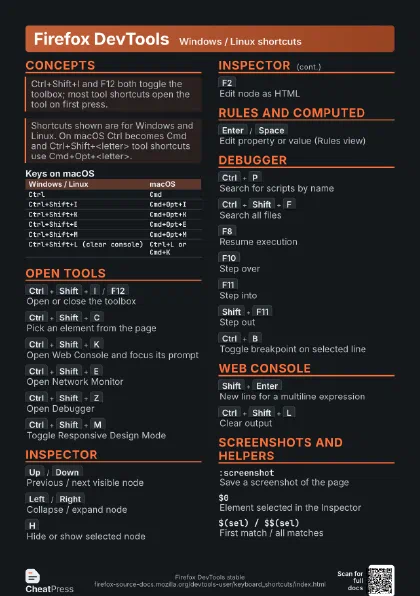
 Light · A4 landscape
297 × 210 mm · PDF
 Dark · A4 landscape
297 × 210 mm · PDF
 Ink saver · A4 landscape
297 × 210 mm · PDF
 Light · A3 landscape
420 × 297 mm · PDF
 Dark · A3 landscape
420 × 297 mm · PDF
 Ink saver · A3 landscape
420 × 297 mm · PDF
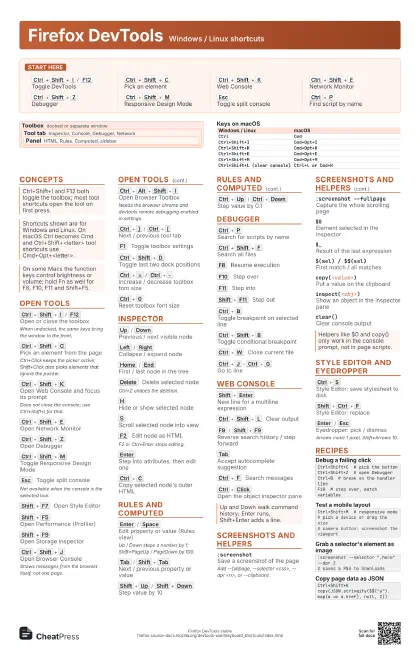
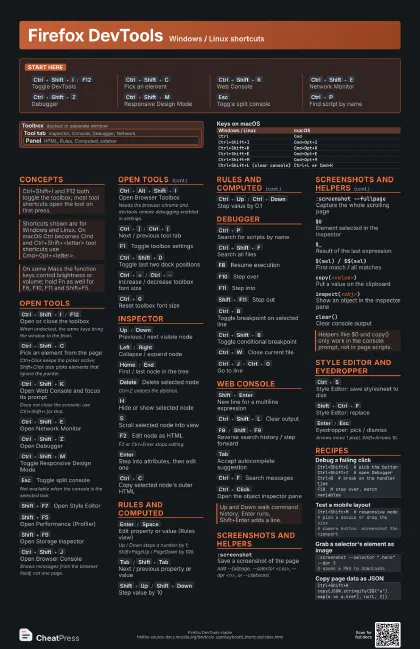
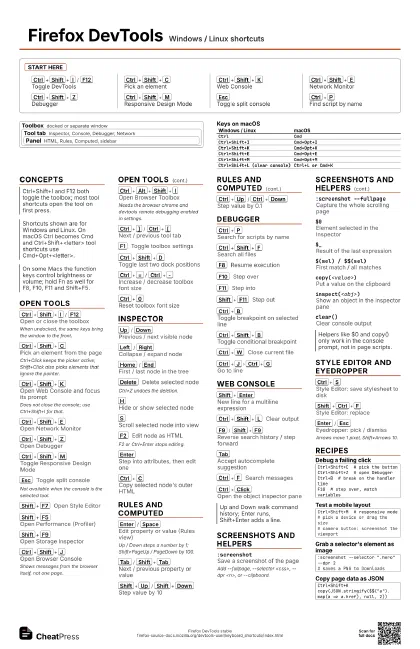
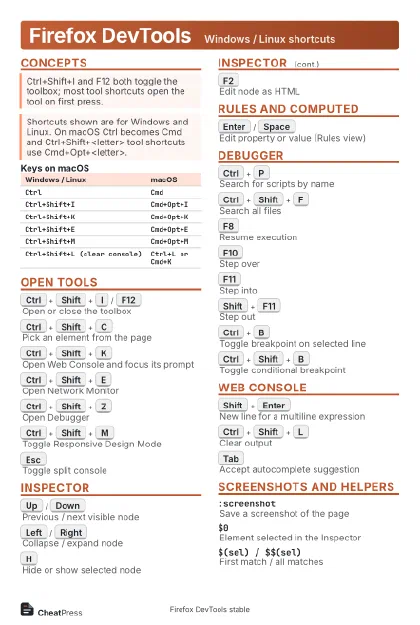
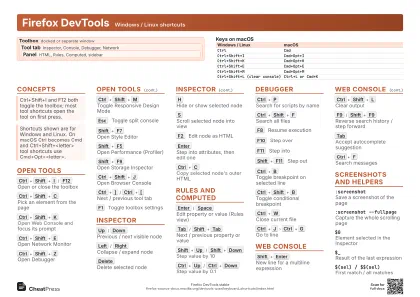
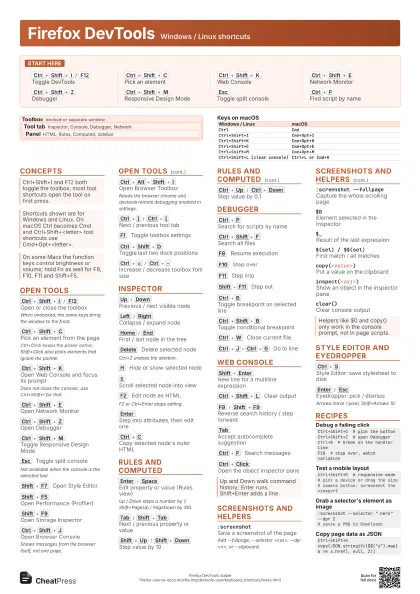
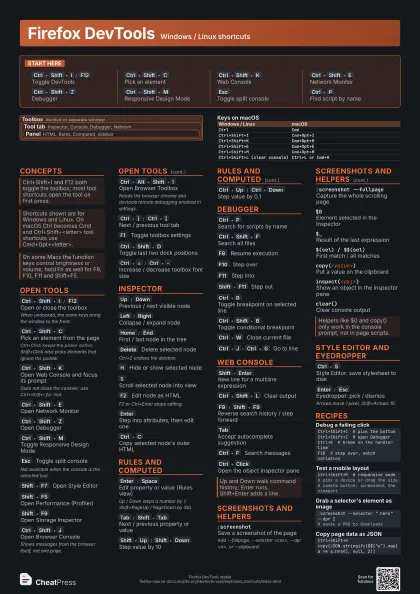
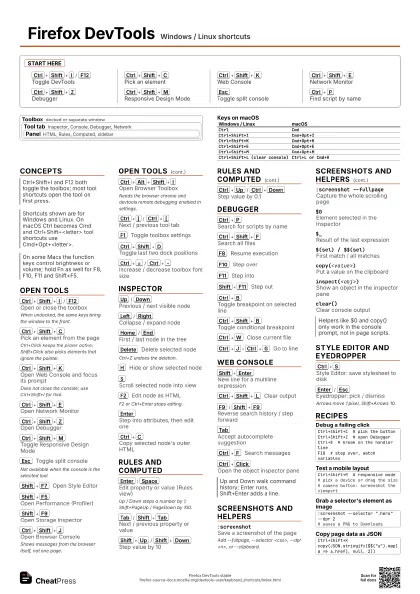
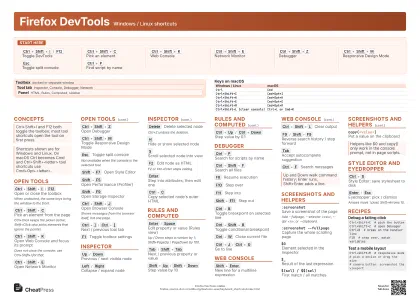
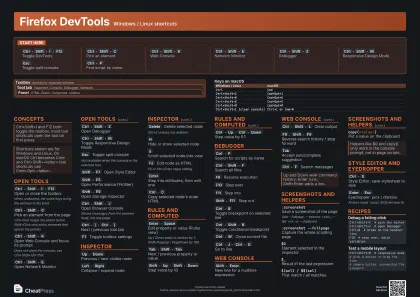
Start here
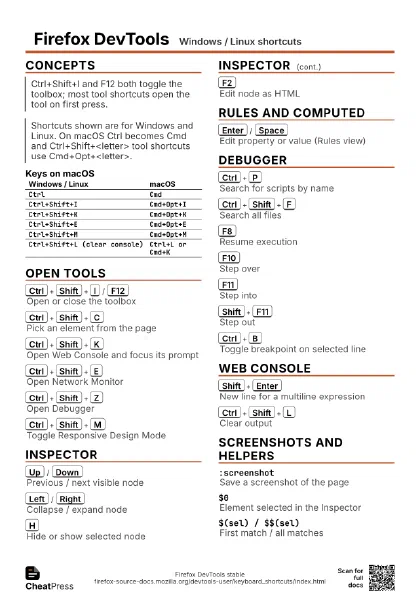
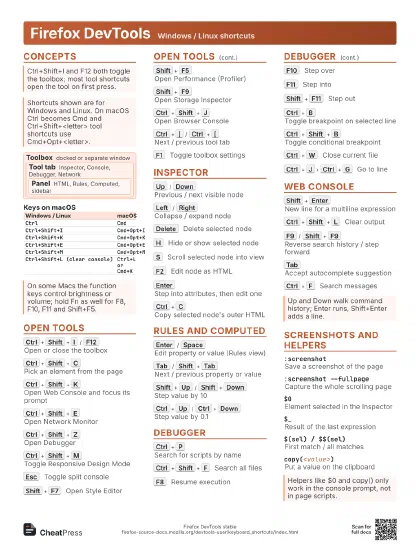
Ctrl+Shift+I
/
F12
Toggle DevTools
Ctrl+Shift+C
Pick an element
Ctrl+Shift+K
Web Console
Ctrl+Shift+E
Network Monitor
Ctrl+Shift+Z
Debugger
Ctrl+Shift+M
Responsive Design Mode
Esc
Toggle split console
Ctrl+P
Find script by name
Concepts
Toolbox
docked or separate window
Tool tab
Inspector, Console, Debugger, Network
Panel
HTML, Rules, Computed, sidebar
| Windows / Linux | macOS |
|---|---|
Ctrl |
Cmd |
Ctrl+Shift+I |
Cmd+Opt+I |
Ctrl+Shift+K |
Cmd+Opt+K |
Ctrl+Shift+E |
Cmd+Opt+E |
Ctrl+Shift+M |
Cmd+Opt+M |
Ctrl+Shift+L (clear console) |
Ctrl+L or Cmd+K |
Open tools
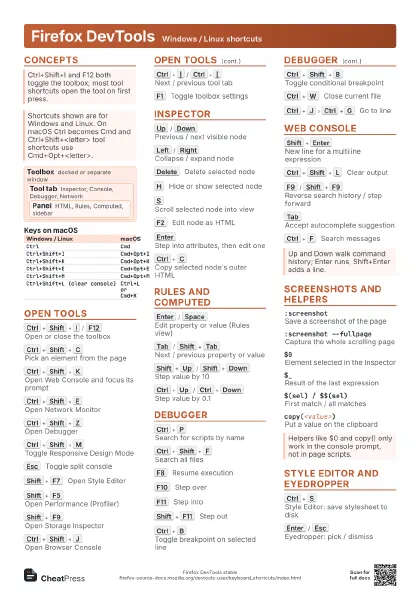
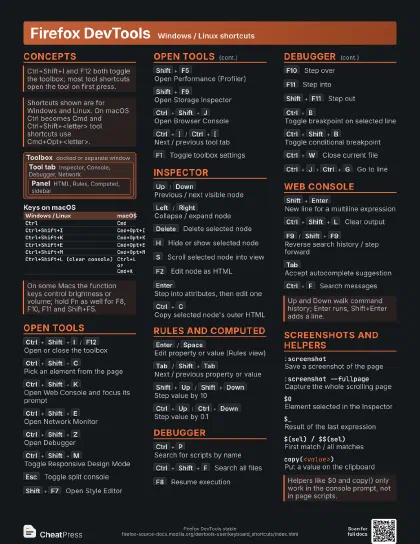
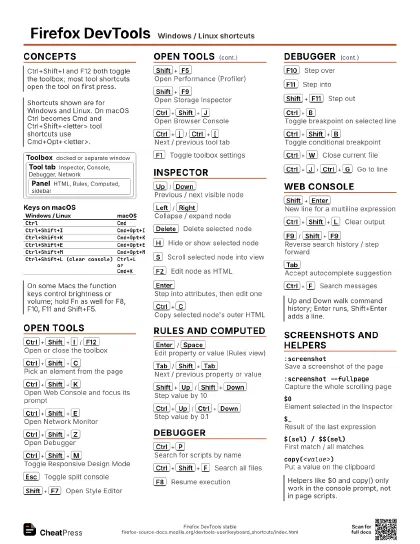
Ctrl+Shift+I
/
F12
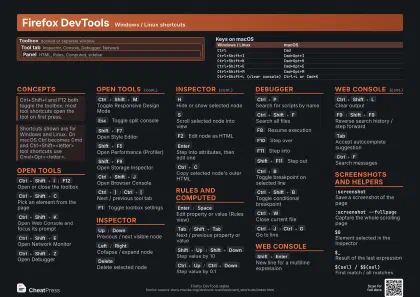
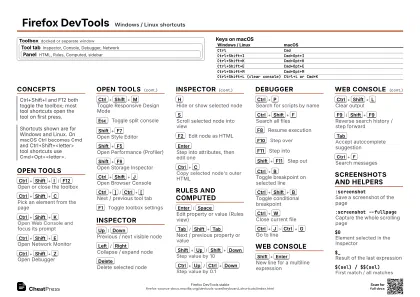
Open or close the toolbox
When undocked, the same keys bring the window to the front.
Ctrl+Shift+C
Pick an element from the page
Ctrl+Click keeps the picker active; Shift+Click also
picks elements that ignore the pointer.
Ctrl+Shift+K
Open Web Console and focus its prompt
Does not close the console; use Ctrl+Shift+I for that.
Ctrl+Shift+E
Open Network Monitor
Ctrl+Shift+Z
Open Debugger
Ctrl+Shift+M
Toggle Responsive Design Mode
Esc
Toggle split console
Not available when the console is the selected tool.
Shift+F7
Open Style Editor
Shift+F5
Open Performance (Profiler)
Shift+F9
Open Storage Inspector
Ctrl+Shift+J
Open Browser Console
Shows messages from the browser itself, not one page.
Ctrl+Alt+Shift+I
Open Browser Toolbox
Needs the browser chrome and devtools remote debugging enabled
in settings.
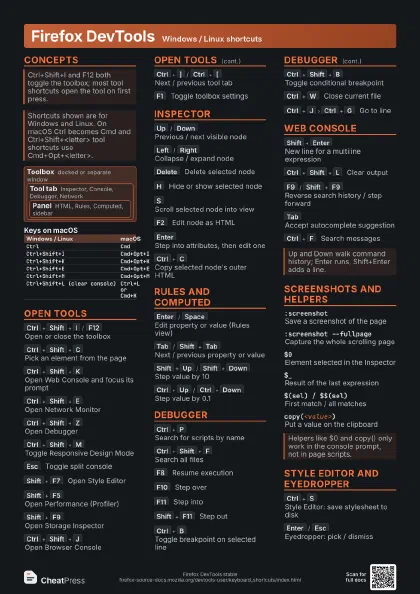
Ctrl+]
/
Ctrl+[
Next / previous tool tab
F1
Toggle toolbox settings
Ctrl+Shift+D
Toggle last two dock positions
Ctrl+=
/
Ctrl+-
Increase / decrease toolbox font size
Ctrl+0
Reset toolbox font size
Inspector
Up
/
Down
Previous / next visible node
Left
/
Right
Collapse / expand node
Home
/
End
First / last node in the tree
Delete
Delete selected node
Ctrl+Z undoes the deletion.
H
Hide or show selected node
S
Scroll selected node into view
F2
Edit node as HTML
F2 or Ctrl+Enter stops editing.
Enter
Step into attributes, then edit one
Ctrl+C
Copy selected node's outer HTML
Rules and Computed
Enter
/
Space
Edit property or value (Rules view)
Up / Down steps a number by 1; Shift+PageUp / PageDown by
100.
Tab
/
Shift+Tab
Next / previous property or value
Shift+Up
/
Shift+Down
Step value by 10
Ctrl+Up
/
Ctrl+Down
Step value by 0.1
Debugger
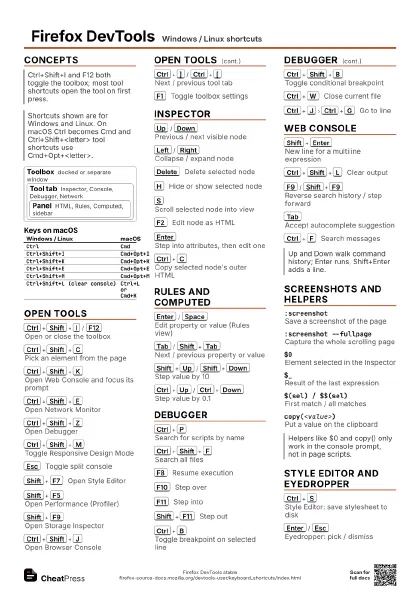
Ctrl+P
Search for scripts by name
Ctrl+Shift+F
Search all files
F8
Resume execution
F10
Step over
F11
Step into
Shift+F11
Step out
Ctrl+B
Toggle breakpoint on selected line
Ctrl+Shift+B
Toggle conditional breakpoint
Ctrl+W
Close current file
Ctrl+J
Ctrl+G
Go to line
Web Console
Shift+Enter
New line for a multiline expression
Ctrl+Shift+L
Clear output
F9
/
Shift+F9
Reverse search history / step forward
Tab
Accept autocomplete suggestion
Ctrl+F
Search messages
Ctrl+Click
Open the object inspector pane
Screenshots and helpers
:screenshotSave a screenshot of the page
Add --fullpage, --selector <css>, --dpr <n>, or
--clipboard.
:screenshot --fullpage
Capture the whole scrolling page
$0Element selected in the Inspector
$_Result of the last expression
$(sel) / $$(sel)
First match / all matches
copy(<value>)
Put a value on the clipboard
inspect(<obj>)
Show an object in the inspector pane
clear()Clear console output
Style Editor and Eyedropper
Ctrl+S
Style Editor: save stylesheet to disk
Shift+Ctrl+F
Style Editor: replace
Enter
/
Esc
Eyedropper: pick / dismiss
Arrows move 1 pixel, Shift+Arrows 10.
Recipes
Ctrl+Shift+C # pick the buttonCtrl+Shift+Z # open DebuggerCtrl+B # break on the handler lineF10 # step over, watch variablesCtrl+Shift+M # responsive mode# pick a device or drag the size# camera button: screenshot the viewport:screenshot --selector ".hero" --dpr 2# saves a PNG to DownloadsCtrl+Shift+Kcopy(JSON.stringify($$("a").map(a => a.href), null, 2))